






Table of Contents
[ Show/Hide ]- • Why can a stop loss trigger when the chart never reached it?
- • Which price actually triggers a stop loss?
- • Why the chart price may not be the stop-loss trigger price
- • How a wider spread can trigger a stop loss
- • What happens to a stop loss during a market gap?
- • Stop-loss trigger price and execution price are not the same thing
- • Worked examples: why the stop can trigger before the visible chart level
- • Why broker and platform rules matter
- • What a stop loss can and cannot guarantee
- • Common reasons a stop loss seems to trigger too early
- • A troubleshooting checklist when a stop loss looks wrong
- • Final takeaway
- • FAQ
- • Sources and methodology
- • Risk warning and disclaimer
A forex stop loss can trigger even when the visible chart appears not to touch the stop level because the chart price, the price used to trigger the stop, and the final execution price are not always the same.
In MetaTrader 5 OTC trading, a long-position Stop Loss is checked against the Bid price, while a short-position Stop Loss is checked against the Ask price. MT5 also states that OTC charts are based on Bid prices. This is why a short stop can be triggered by Ask even when the visible Bid candle appears to remain below the stop level.
Spread widening, market gaps, and slippage can create further differences. A standard stop level is a trigger condition, not a guarantee that the position will close at the exact number entered. The broker, instrument, and execution rules still matter, so the broker's own policy and order history remain the final references for a specific trade.
Why can a stop loss trigger when the chart never reached it?
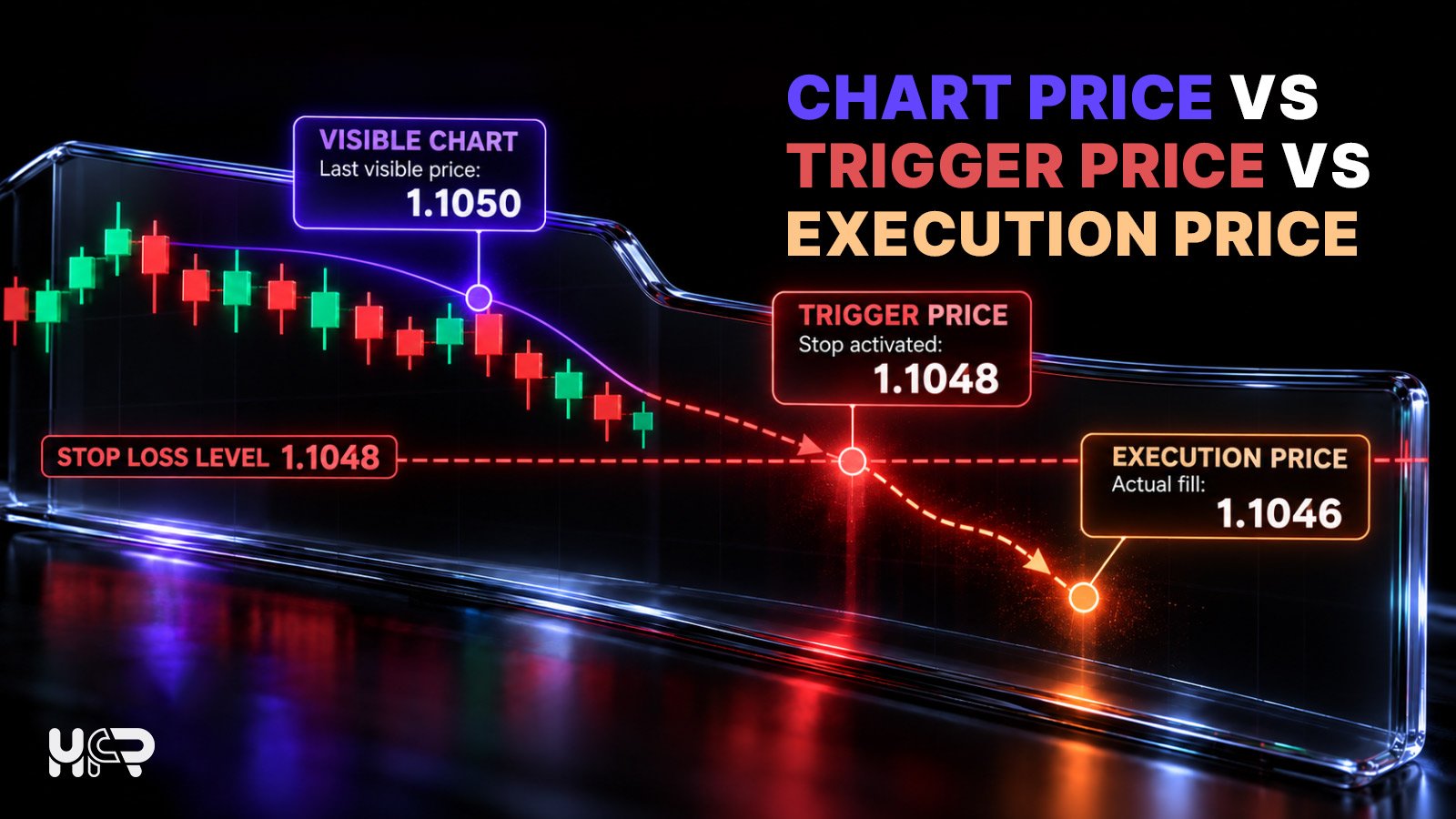
The key is to separate three different prices that traders often treat as if they were the same:
| AssPrice concept | What it means |
|---|---|
| Chart price | The price stream used to draw the visible chart or candle. |
| Trigger price | The Bid, Ask, Last or other reference used to determine whether the stop condition has been met. |
| Execution price | The price at which the closing transaction is actually filled after the stop is triggered. |
These prices can be very close in quiet markets, but they do not have to match. A stop can therefore be triggered correctly even when the visible candle does not print the exact stop level.
Which price actually triggers a stop loss?
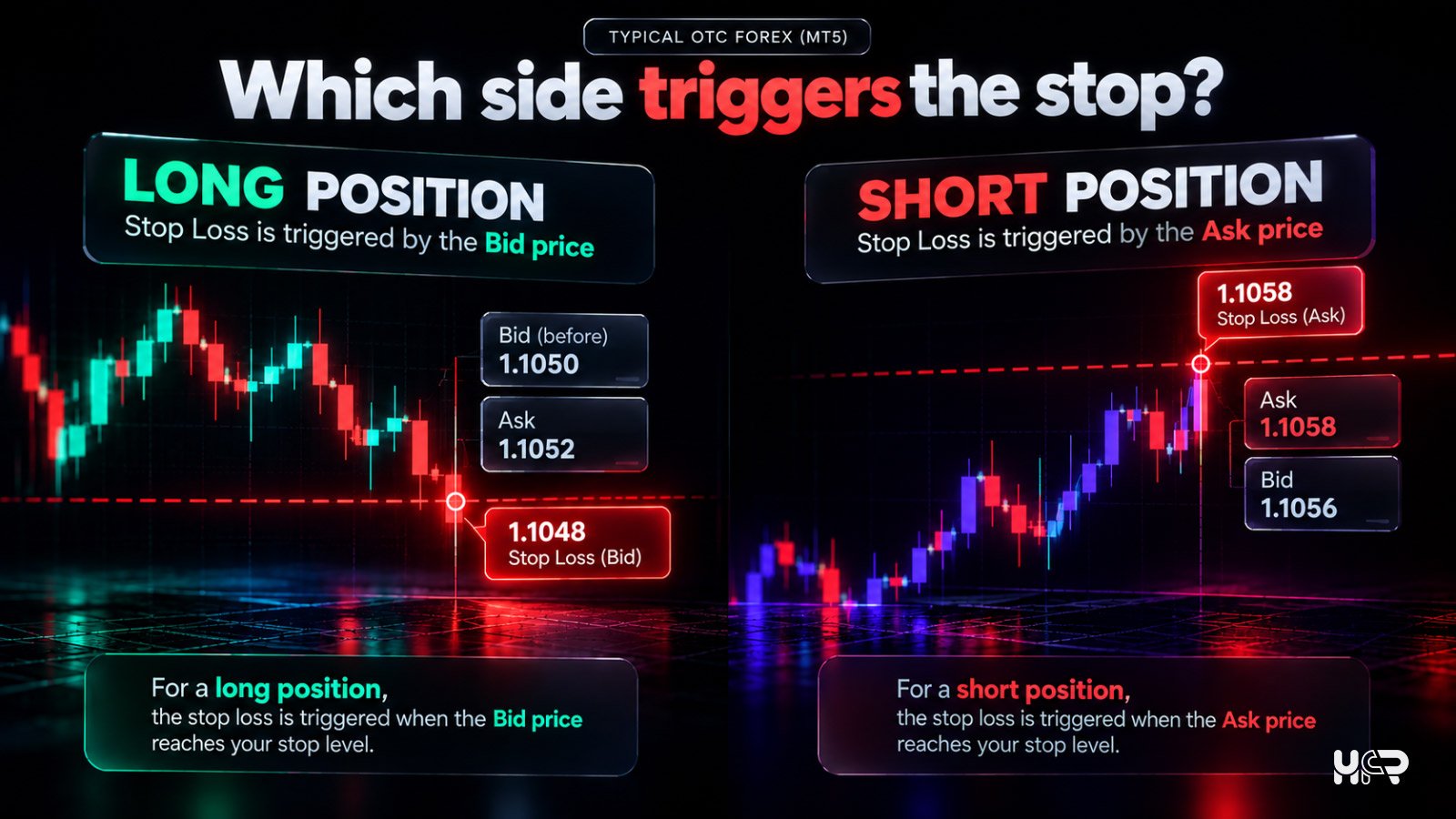
For MetaTrader 5 OTC instruments, Stop Loss conditions are checked using Bid and Ask prices. The relevant side depends on the direction of the open position.
How a long position uses the Bid price
A long position is closed with a sell. In MT5 OTC trading, its Stop Loss condition is therefore checked against Bid. If Bid reaches or moves through the stop level, the closing operation can be triggered.
How a short position uses the Ask price
A short position is closed with a buy. In MT5 OTC trading, its Stop Loss condition is therefore checked against Ask. This is a common reason a short trade appears to stop out before a Bid-based chart reaches the stop level.
| Position | Typical OTC MT5 Stop Loss trigger | Weakening signal |
|---|---|---|
| Long | Bid | Closing the long position requires a sell |
| Short | Ask | Closing the short position requires a buy |
This convention is not universal across every market. MetaTrader 5 documents separate triggering logic for exchange-traded symbols, where Last price is commonly used. Broker and instrument specifications should therefore be checked before applying the OTC forex convention elsewhere.
Why the chart price may not be the stop-loss trigger price
Why many forex charts show only one side of the quote
A forex quote has both Bid and Ask, but the chart may display only one price stream. MetaTrader 5 states that OTC charts are based on Bid prices, while other broker platforms may offer Bid, Ask or Mid views. If the chart is not showing the side used to trigger the stop, the relevant price can reach the stop without the visible candle doing so.
When the hidden Ask or Bid can reach your stop first
The issue is most obvious with a short position on a Bid-based chart. Ask sits above Bid by the spread. If the spread widens, Ask can reach a short Stop Loss while the Bid candle remains below it. A similar mismatch can occur when a long-position stop is judged against Bid but the trader is reviewing an Ask- or Mid-based chart.
For a full explanation of which side applies when opening and closing trades, see HFR's Bid vs Ask in Forex guide.
How a wider spread can trigger a stop loss
The spread is the difference between Ask and Bid, and it is not always fixed. During volatile conditions, lower liquidity, major news, and market openings or closings, Bid and Ask can move further apart.
What happens when Bid and Ask move further apart
Suppose Bid changes only slightly while Ask rises because the spread widens. A short position can have its Stop Loss triggered by Ask even though the Bid chart barely moves. For a long position, a lower Bid can trigger the stop even if an Ask- or Mid-based chart appears further from the stop.
Why spread widening can matter without a large chart move
OANDA Corporation documents that wider spreads during volatile conditions can trigger Stop Loss and Take Profit orders because those orders are evaluated using Bid and Ask prices. The movement of one visible chart line therefore does not always show the full change in the two-sided quote.
What happens to a stop loss during a market gap?
Why price can move through the stop level
A gap occurs when the next available market price appears beyond the stop level with little or no tradable pricing between. This is especially relevant around market reopenings and can also occur during abrupt repricing or thin liquidity.
If a long position has a Stop Loss at 1.0950 and Bid jumps from 1.0954 to 1.0946, the stop condition has been passed even if no Bid tick printed exactly at 1.0950.
Why the execution price may differ from the stop price
After the stop condition is met, the corresponding closing operation is executed under the broker's rules and available market pricing. If the market has already moved through the stop, the fill can be worse than the stop level.
OANDA Corporation likewise notes that, when trading resumes after a gap, a stop loss can be triggered and executed at the prevailing market rate rather than the specified stop price.
Stop-loss trigger price and execution price are not the same thing
What happens when the stop condition is met
A standard Stop Loss defines the condition that activates the closing operation when the relevant trigger price reaches the stop level. The resulting execution then follows the instrument and broker rules.
How slippage can change the final fill price
The market can continue moving after the stop condition is met, so the final fill can differ from the stop level. That difference is slippage.
HFR's Forex Slippage Explained guide covers the difference between an expected price and the actual fill in more detail.
Worked examples: why the stop can trigger before the visible chart level
Short EUR/USD example: Ask triggers above a Bid-based chart
Assume a trader is short EUR/USD with a Stop Loss at 1.1050. The chart is Bid-based.
| Quote component | Before spread widening | After spread widening |
|---|---|---|
| Bid | 1.1045 | 1.1047 |
| Ask | 1.1047 | 1.1051 |
| Spread | 2 pips | 4 pips |
The visible Bid candle has reached only 1.1047, so it appears to remain below the 1.1050 stop. But Ask has reached 1.1051. Because the short-position Stop Loss is checked against Ask in MT5 OTC trading, the stop condition can be met even though the Bid-based candle never touches 1.1050.
Long EUR/USD example: a gap jumps through the stop
Now assume a long EUR/USD position has a Stop Loss at 1.0950. The last Bid before a gap is 1.0954, but the next available Bid is 1.0946. The market does not need to print every price between those values. The stop condition has been crossed, and the closing operation may execute at the available market price rather than exactly 1.0950.
The short example shows a hidden-side-of-quote trigger; the long example shows a gap through the stop followed by execution at the available price.
Why broker and platform rules matter
Why trigger rules are not identical for every instrument
OTC forex conventions should not automatically be applied to exchange-traded instruments or products that use another reference price. MetaTrader 5 documents separate logic for exchange symbols, where Last price is commonly used for triggering conditions.
What to check in the broker's execution policy
Check which price stream is used for charts, which reference triggers Stop Loss for long and short positions, how gaps are handled, and how the execution policy describes slippage and price improvement or deterioration. The instrument specification and account terms can also matter.
For broader context on execution policies, legal entities and account conditions, see HFR's What Is a Forex Broker? guide.
What a stop loss can and cannot guarantee
| A standard stop loss can | A standard stop loss does not necessarily guarantee |
|---|---|
| Define a price condition for an automated exit | That the visible chart will show the same trigger price |
| Request closure when the relevant trigger condition is met | Exact execution at the stop price, a fixed spread, or protection from slippage and gap risk |
Common reasons a stop loss seems to trigger too early
- The chart displayed Bid while a short-position stop was checked against Ask.
- The spread widened and moved the relevant side of the quote to the stop level.
- The market gapped through the stop level without printing every intermediate price.
- The trigger price and final execution price differed because of slippage.
- The trader reviewed candle OHLC but not the tick or quote history around the event.
- The chart came from a different broker, data feed, or pricing configuration.
- The instrument used exchange-specific or broker-specific trigger rules rather than the assumed OTC forex convention.
A troubleshooting checklist when a stop loss looks wrong
- Confirm whether the position was long or short.
- Identify which price side was supposed to trigger the stop: Bid, Ask, Last or another broker-defined reference.
- Check the stop level recorded in the order history rather than relying only on a chart drawing.
- Review Bid and Ask quotes around the exact timestamp if the platform provides them.
- In MT5, enable the Ask price line when investigating a short-position stop if your broker or platform supports it.
- Check whether the spread widened around news, market open/close or a low-liquidity period.
- Look for a gap or sudden jump through the stop level.
- Compare the stop trigger level with the actual execution price to identify possible slippage.
- Use the broker's own chart or data feed rather than another provider's chart for the first comparison.
- Read the broker's execution policy and instrument specification.
- If the execution still appears inconsistent, save the order ID, timestamp and screenshots and ask the broker to review the trade.
Final takeaway
A stop loss can trigger even when the visible chart appears not to reach it because chart price, trigger price, and execution price are different concepts. In MetaTrader 5 OTC trading, long-position stops are checked against Bid, and short-position stops against Ask.
Spread widening can move the relevant quote side to the stop, while gaps and slippage can produce a different fill. If a stop looks wrong, check the trade direction, Bid/Ask history, spread conditions, any gap, the order timestamp, and the broker's execution rules before drawing a conclusion.
For the pricing mechanics behind the two-sided quote, read HFR's Bid vs Ask in Forex. For the difference between an expected price and the actual fill, continue with Forex Slippage Explained.
FAQ
Why did my stop loss trigger before price reached it?
The chart may have shown a different side of the quote from the one used to trigger the stop. Spread widening, a market gap, instrument-specific rules or slippage can also create a difference between the visible chart, the trigger price and the final fill.
Does a stop loss use Bid or Ask in forex?
In MetaTrader 5 OTC trading, a long position's Stop Loss is checked using Bid and a short position's Stop Loss is checked using Ask. Exchange-traded instruments and broker-specific implementations can use different rules.
Can the spread trigger my stop loss?
Yes. If Bid and Ask move further apart, the side relevant to your Stop Loss can reach the trigger level even when the other side of the quote has moved much less.
Why did my stop loss trigger but the candle never touched it?
The candle may display only Bid, Ask or another price stream, while the stop was triggered by a different side. A gap can also jump through the stop level without printing exactly at that price.
Can a stop loss execute at a worse price?
Yes. A standard stop loss does not guarantee an exact fill price. During fast markets, gaps or limited liquidity, the execution price can be worse than the stop level.
What happens to a stop loss during a market gap?
If the next available market price is already beyond the stop level, the stop can be triggered and the closing transaction may execute at the available market price rather than the original stop price.
Does MT5 use Bid or Ask for stop loss?
MetaTrader 5 states that Stop Loss on long OTC positions is checked against Bid and Stop Loss on short OTC positions against Ask. For exchange-traded symbols, different trigger rules such as Last price can apply.
Can two brokers trigger the same stop loss differently?
They can. Brokers can have different quote feeds, spreads, server settings, execution policies or instrument specifications. The same nominal stop level can therefore encounter different trigger prices or execution conditions at different brokers.
How can I check why my stop loss was triggered?
Start with the order history and exact timestamp, then check the relevant Bid/Ask or other trigger price, spread conditions, any gap, and the final fill. If the result still appears inconsistent, use the broker's execution policy and ask support to review the order ID.
Sources and methodology
This desk-based beginner guide was rechecked on 8 October 2026 against current MetaTrader 5 documentation for Stop Loss triggers and OTC chart construction, and OANDA Corporation help pages covering dynamic spreads and market gaps. MT5 states that long-position Stop Loss conditions are checked against Bid and short-position conditions against Ask, while OTC charts are based on Bid. OANDA Corporation notes that wider spreads can trigger stop orders and that gaps can lead to execution at the prevailing market rate. Broker feeds, instrument rules and execution policies can differ, so the relevant broker documentation remains the final reference for a specific trade.
Sources checked:
- MetaTrader 5 - Basic Principles / Stop Loss
- MetaTrader 5 - Executing Trades
- MetaTrader 5 - Price Data
- OANDA Corporation - Impact of Market Conditions on Spreads
- OANDA Corporation - Hours of Operation / Market Gaps
Risk warning and disclaimer
Forex and CFD trading involve risk of loss, particularly when leverage is used. Stop-loss orders can automate an exit condition, but standard stop losses do not guarantee execution at the requested price. Fast markets, spread changes, gaps, and slippage can increase losses.
This article is for educational and informational purposes only. It should not be treated as financial advice, investment advice, trading advice, or a recommendation to use any broker, platform, asset, or derivative.
 6
6
Share Posts


Further Reading
- Forex Order Types Explained: Market, Limit, Stop and Stop-Limit
- Weekly Market Recap, 19–25 October 2026: Gold and Silver Fall as Crypto Flows Diverge
- Bitcoin, Ethereum, Solana, Gold and Silver: Daily Technical Outlook After the October Pullback
- Why Forex Spreads Widen: News, Rollover, Liquidity and Volatility